Skip to content
infolio infolio
v1.0 · Personal knowledge hub

infolio, a knowledge hub of your own.

infolio brings a desktop workspace, document tree, block editor, whiteboards, spreadsheets, databases, global search, vaults, and multi-cloud sync into one connected place.

  • Local-first
  • End-to-end encrypted
  • Multi-cloud sync
  • Cross-platform
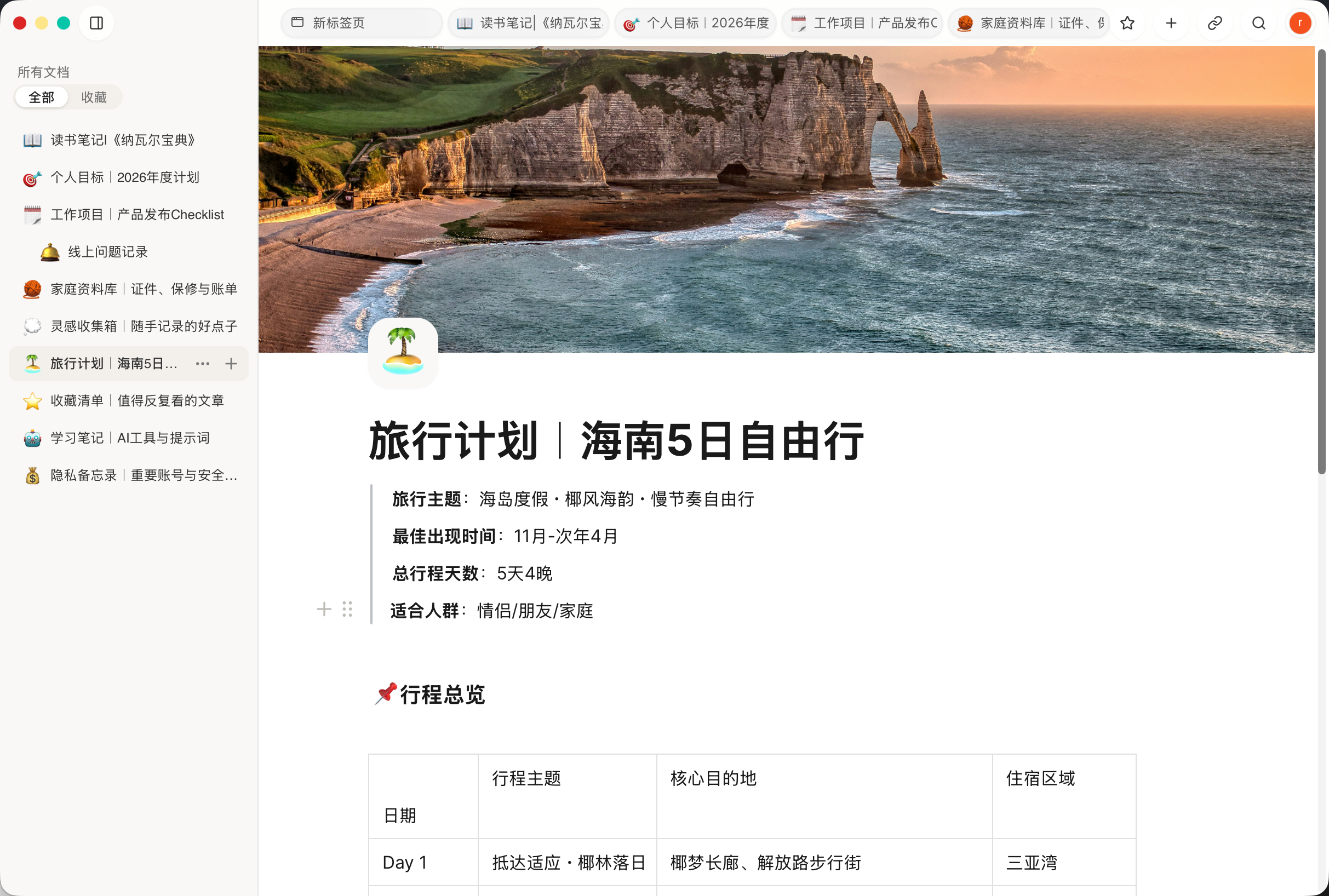
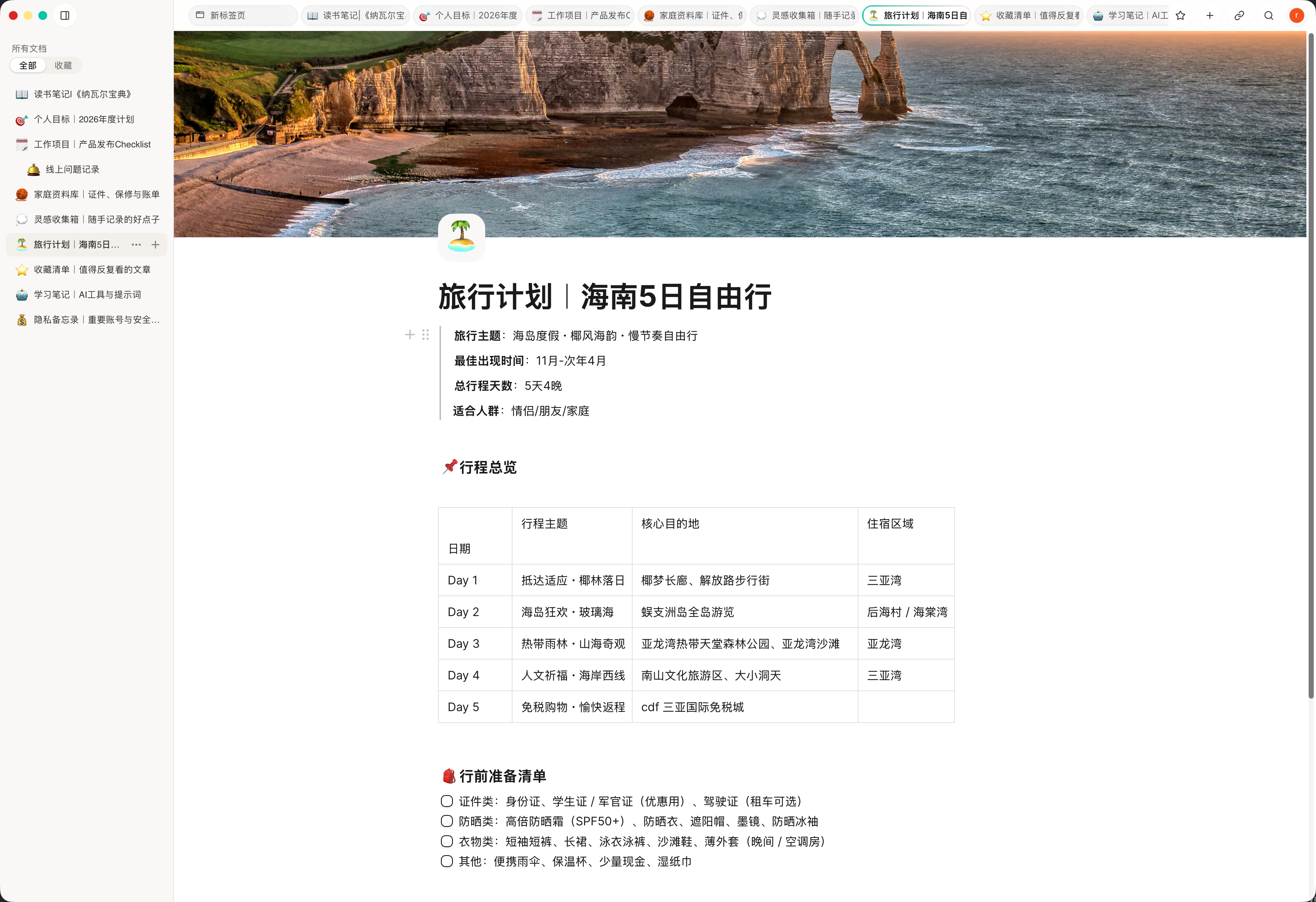
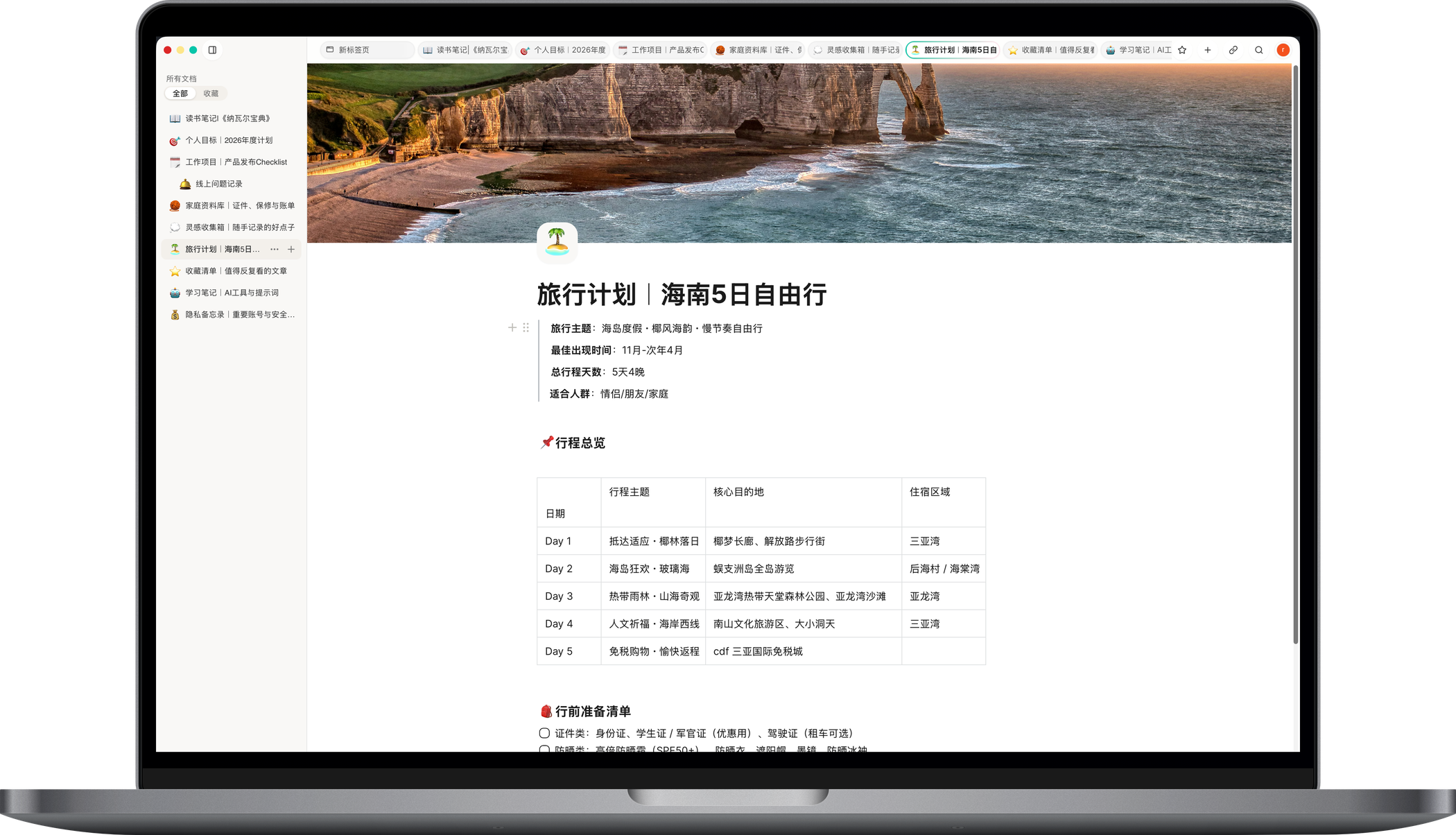
Screenshot of the infolio desktop document editor
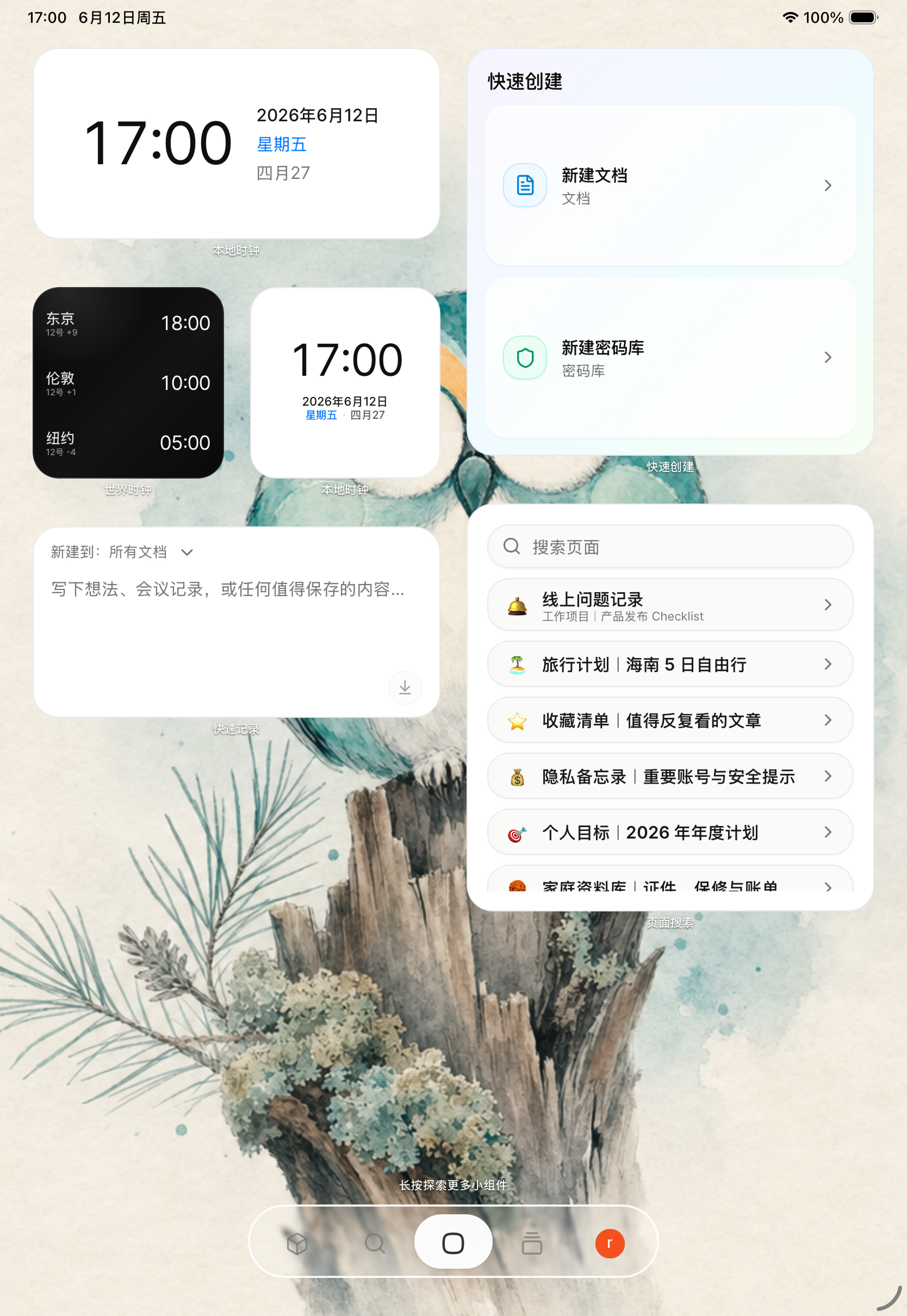
Screenshot of the infolio iPad home widgets
Screenshot of the infolio mobile document center
Built for thinking

A place where scattered information becomes a library

From a fleeting thought to a long-running project, infolio gives every kind of content a natural home — and keeps them quietly connected.

Desktop-style workspace

Multi-desktop, custom wallpapers, pixel-precise drag and drop. Pin documents, links and widgets exactly where your hand expects them.

Multi-window editing

Open as many document windows as you need on the same canvas. Resize, reorder and stack them like real windows so your train of thought never breaks.

Always-on widgets

Calendar, quick capture, todos and link cards live on your desktop. Surface what matters without opening a single document.

Calendar

22

May · Fri

Todo

  • Plan
  • Write

Quick capture

Encrypted vaults

Passwords, keys, IDs and private notes belong in vaults — secured by local end-to-end encryption and biometric unlock.

Vault · locked AES-256

Rich block editor

Block-based writing, Markdown, flowcharts, code blocks and a whiteboard. From a stray thought to a long form draft, all in one place.

B I H1 { }

A document that grows

const idea = "infolio";

Database tables

Manage projects and reference material with fields, views, filters, groups, formulas, and linked records while keeping tables beside documents.

Projects Grouped
NameStatusScore
Research Active 82
Launch Review 64
Archive Done 100

Spreadsheets

Create worksheets with formulas, filters, conditional formatting, and multiple sheets without leaving the document context.

Budget Summary +
ABCD 1 1200 2 3 =SUM 4

Multi-cloud sync

Use the official infolio cloud out of the box, or bring your own iCloud, Aliyun OSS, AWS S3, Cloudflare R2, Tencent COS, Google Cloud or Azure storage.

S3 OSS iCloud R2 COS
End-to-end workflow

Every page serves one continuous knowledge workflow

The web layer carries the main interaction surface, while the native layer handles local storage, device auth, subscriptions and sync channels. What users feel is a complete workflow, not a pile of disconnected features.

01
infolio

Workspace home

Home is your living desktop: drag freely, fit the canvas, switch editing modes and place widgets exactly where they should stay.

  • + Multi-desktop layouts and wallpapers
  • + Drag-and-drop placement with edit mode
  • + Always-on widgets for calendar, clock and capture
02
infolio

Document library

The library organizes folders, docs and secure vaults in one tree, with favorite areas and quick actions for daily curation.

  • + Tree-based folder and page structure
  • + Favorites and full library views
  • + Create, move, rename and copy links fast
03
infolio

Document editor

Docs use a block editor that grows from quick notes into structured writing with attachments, rich blocks and in-page search.

  • + Block-based writing and rich formatting
  • + Search within a page, add files and images
  • + Mobile-friendly read and edit states
04
infolio

Global search

Search goes beyond keywords with filters for type, folder and date, helping large knowledge bases stay navigable.

  • + Search docs and secure docs together
  • + Filter by folder, type and time range
  • + Open results directly as tabs
05
infolio

Tab manager

Tabs keep active work and recently closed pages close at hand, making hopping between contexts and restoring focus effortless.

  • + Open and recently closed tab lists
  • + Restore recently closed content instantly
  • + Breadcrumbs for document location
06
infolio

Whiteboard space

Whiteboards make room for diagrams, relationships and visual thinking, while staying inside the same knowledge base as your documents.

  • + Node and edge based editing
  • + Separate edit and view modes
  • + Saved alongside the rest of your pages
07
infolio

Secure vaults

Vaults are designed for passwords, keys, IDs and other sensitive records, with device authentication before entry and before risky actions.

  • + Structured fields and custom icons
  • + Local decryption and re-auth for edits
  • + Security-first view, edit and delete flows
08
infolio

Settings and sync

Settings centralize account info, locale switching, official cloud, third-party sync origins, subscription restore and legal entry points.

  • + Profile and avatar management
  • + Official cloud and custom sync origins
  • + Privacy, terms and subscription restore
Privacy by design

Your knowledge stays yours

infolio is local-first. Sensitive content is sealed on your device before it ever leaves it — even our servers cannot read it.

  • End-to-end encryption

    Sync data and attachments are encrypted on-device with AES-256-GCM. Attachments use chunked encryption, and the cloud stores authenticated ciphertext only.

  • Biometric unlock

    Face ID, Touch ID, Windows Hello and system passcode guard every sensitive entry point.

  • Local-first

    Everything writes to a local database first. Work offline, sync incrementally when you are back — not a word is lost.

Encrypted vault AES · 256
Gi

GitHub

••••••••••••

token
AW

AWS Production

AKIA· •••• ••••

access key
Pe

Personal ID

420••• ••• ••••

document
Re

Recovery phrase

apple · river · ··· · north

24 words
Unlocked with Face ID ⌥ ⌘ L
Sync is a choice, not a lock-in

Your knowledge follows you. You choose where it lives.

Content works locally first. When you need to move between devices, choose the route that fits: turnkey official cloud, iCloud for Apple workflows, or object storage under your own account.

Sync status Connected
Official cloud Official cloud
iCloud iCloud
Aliyun OSS Aliyun OSS
AWS S3 AWS S3
Cloudflare R2 Cloudflare R2
Tencent COS Tencent COS
Google Cloud Google Cloud
Azure Blob Azure Blob
Volcengine TOS Volcengine TOS
Encrypted before transfer Updated just now
01

Local first

Write, map, and organize offline. Sync never interrupts the thought in progress.

02

Choose storage

Official cloud is simple; custom sources keep the sync layer in an account you trust.

03

Keep going

Connect the same source on a new device and continue where the project, docs, and widgets left off.

Cross-platform

Naturally continuous on every device

macOS, iOS/iPadOS, and Android are available now. Windows is coming soon.

Social channels

Stay close through public channels

If social platforms are where you usually follow product updates, these public channels are the easiest way to keep in touch with infolio.

Xiaohongshu
Xiaohongshu
xhslink.com/m/CFEvVPa8Cx
Open
X / Twitter
X / Twitter
x.com/roadhog_whateve
Open
Discord
Discord
discord.gg/PEJyjWn6Ku
Open
WeChat
WeChat
roadhog_whatever
WeChat roadhog_whatever
FAQ

Frequently asked questions

Is infolio free?

The core experience — local editing, vaults, multi-desktop and widgets — is free forever. Premium adds the official cloud sync and dedicated storage.

Where is my data stored?

In a local database by default. When you turn on sync, choose the official infolio cloud, or your own iCloud / OSS / S3 bucket. Sensitive content is encrypted on-device.

What if I switch devices?

Sign in on the new device with the same sync source. infolio will pull and merge your entire knowledge hub automatically.

Which platforms are supported?

The website currently provides macOS, iOS/iPadOS, and Android download links. Windows is marked as coming soon.

Does infolio support documents, whiteboards, spreadsheets, and databases?

Yes. They support writing, visual reasoning, tracking, and structured material inside the same local-first knowledge hub.

Do widget layouts sync to a new device?

Yes. Widget data and layouts are included in the sync flow, then you can fine-tune them for the new device and your current habits.

How should I choose a sync source?

Use official cloud for the simplest setup, iCloud for Apple-first workflows, or your own OSS, S3, R2, COS, GCS, Azure Blob, or TOS when you already manage object storage.

Settle your knowledge into infolio

Download infolio for free and start building your own personal knowledge hub.